- Tracks |
- Mixes/lives |
- Events |
- EPs |
- Albums/CDs |
- Studio |
- Social Room |
- Downloads |
- Links |
- Blog |
- Contacts |
I basically learned beatmatching thanks to Beatific BPM counter for Amiga, and to this day I've never found a beat counter that could match how good it is. The main reason is the way bars are displayed in a 4×4 grid. Well, this actually has a name: STEP SEQUENCER, just like the ones on the Roland TR-808 and TR-909.
So I came up with this vibe-coded HTML/JS/CSS-based beat counter that implements Beatific's logic in a TR-808-style interface. There's nothing here I couldn't have done myself, but Claude did all the tedious work, allowing me to spend no more than two hours on it, prompting and debugging included.
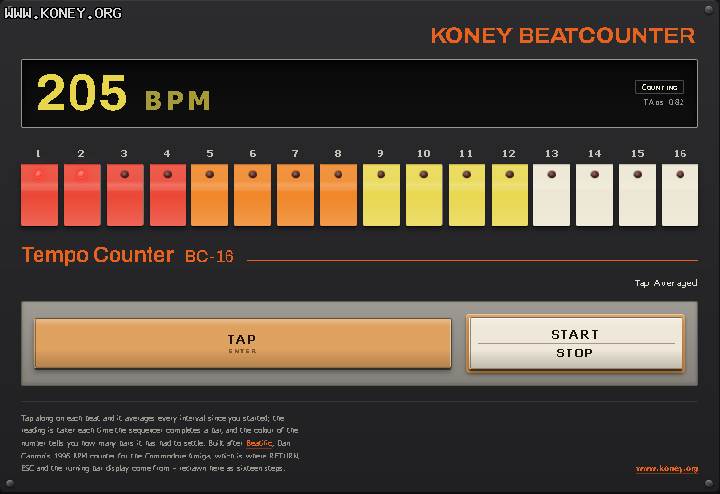
But what genuinely blew me away, and what I wouldn't have come up with by myself, is the name Claude chose for it. My prompt was a photo of the original machine and something like: "Examine this picture and try to match as many elements as possible in the UX." and Claude came up with Tempo Counter BC-16, which is a super cool paraphrase of Rhythm Composer TR-808! Well done :)
Here's the initial prompt:
Build a self-contained HTML-CSS-JS app of a BEATCOUNTER.
Visually, there will be a step-sequencer like display (like a TR-808) with the usual 16 buttons, each with a RED light and numbered 1 to 16.
There will be a TAP button, triggered by RETURN/ENTER keys also. This will work as a beatcounter. Each time TAP is pressed a new button on the step-sequencer is lit, until 16 , then it’s reset to 1. Milliseconds from each TAP/ENTER press are used to calculate an average BPM. The calculation is made when button 16 is lit. The averages keep in count all registered timings until a new button is pressed: START/STOP also triggered by ESC key. This button stops the averaging and reset everything to 0 if pressed again. Above the step-seq BPM output element will show the result as an integer value. Buttons are below the step-seq. So this is the elements final display chart: BPM, step-sequencer, TAP, START/STOP. For mobile, everything is pretty much the same except the sequencer buttons are arranged in 4 rows of 4 elements each. Later there will be some CSS modifications so buttons will have different colors each, so keep this ready for later as css classes.